
Download Cloud 66 – Secure Cloud‑Based Development Tool for Web Developers
Overview
Cloud 66 is a powerful, cloud‑native platform that brings the entire web‑development workflow into a single, cohesive environment. Designed specifically for developers who need to deploy, scale, and manage applications without wrestling with complex infrastructure, Cloud 66 offers a blend of automation, flexibility, and deep integration with popular services such as Docker, Kubernetes, AWS, and Heroku. While the learning curve can feel steep at first, the tool’s comprehensive documentation, step‑by‑step tutorials, and active community forums make the onboarding process smoother than many competing solutions.
Whether you are building a simple static site or a multi‑service micro‑architecture, Cloud 66 provides the scaffolding to push code from a local repository to production with just a few clicks. Its emphasis on security—encrypted communications, role‑based access control, and automated patching—ensures that your deployments remain both fast and compliant. Moreover, the platform receives regular updates that introduce new features, performance improvements, and bug fixes, keeping the software modern and reliable.
For developers looking for a free tier to test the waters, Cloud 66 offers a generous trial that includes core functionalities, making it an attractive option for startups and hobbyists alike.
Core Features
- One‑Click Deployment: Push code from GitHub, GitLab, or Bitbucket and let Cloud 66 handle container creation, environment variable injection, and service discovery automatically.
- Multi‑Cloud Support: Deploy to AWS, Google Cloud, Azure, DigitalOcean, or on‑premise servers without changing your configuration files.
- Docker & Kubernetes Integration: Seamlessly build Docker images, orchestrate pods, and manage clusters directly from the Cloud 66 dashboard.
- Live Scaling & Auto‑Recovery: Define scaling rules based on CPU, memory, or request load; the platform auto‑adds or removes instances and restarts failed containers.
- Secure Secrets Management: Store API keys, database passwords, and TLS certificates in an encrypted vault with fine‑grained access controls.
- Continuous Updates: Automatic patching of underlying OS and runtime components, ensuring that your stack stays up‑to‑date without manual intervention.
- Extensive Monitoring: Real‑time logs, health checks, and performance dashboards help you spot issues before they affect users.
- CLI & API Access: For power users, the Cloud 66 command‑line interface and RESTful API allow scripting of complex workflows and integration with CI/CD pipelines.
- Free Tier & Transparent Pricing: Start for free, then upgrade to pay‑as‑you‑go plans that scale with your usage, avoiding surprise costs.
Installation & Usage Guide
Getting started with Cloud 66 is straightforward, thanks to its cross‑platform installers and clear documentation. The first step is to download the Cloud 66 CLI, which is available for Windows, macOS, and Linux. The installer is a lightweight executable that verifies the download’s integrity using SHA‑256 checksums, ensuring a secure installation process. After running the installer, open a terminal (or PowerShell on Windows) and run cloud66 login to authenticate with your Cloud 66 account. If you don’t have an account yet, the CLI will guide you through a quick sign‑up flow that includes email verification and optional two‑factor authentication for added security.
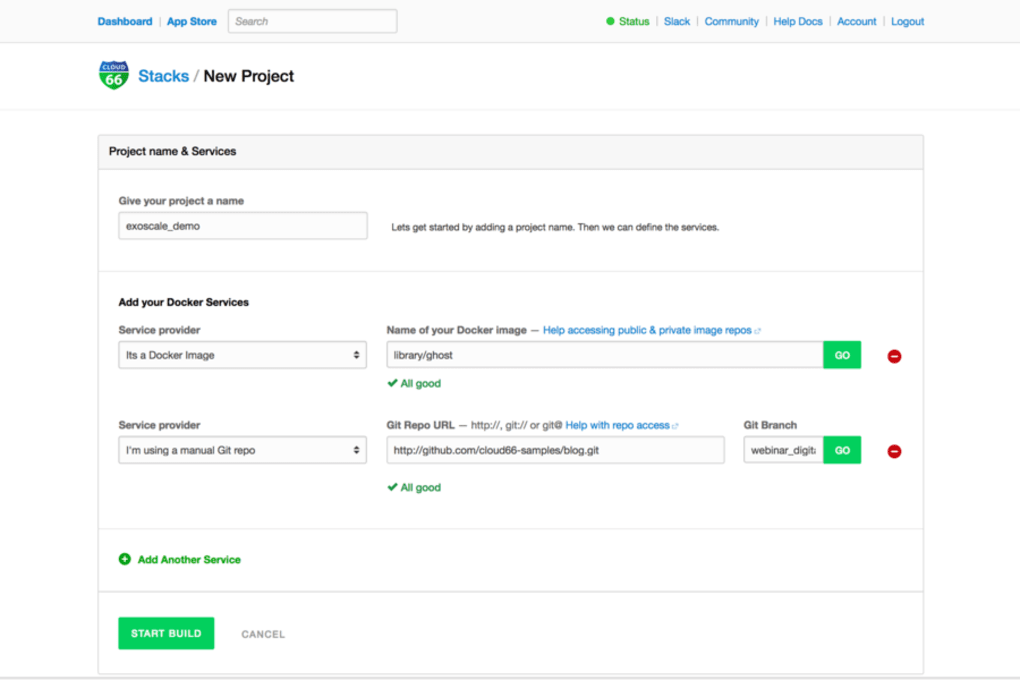
Once logged in, you can create a new stack with the command cloud66 stack create. The wizard asks for the repository URL, the desired cloud provider, and any environment variables you wish to inject. Cloud 66 automatically detects the language runtime (Node.js, Ruby, Python, etc.) and generates a default Dockerfile if none is present. For developers who prefer a graphical approach, the web dashboard offers a visual editor where you can drag‑and‑drop services, configure load balancers, and set up database connections without touching code.
Compatibility is a strong point of Cloud 66. It supports the latest versions of Windows 10/11, macOS Ventura and later, and major Linux distributions such as Ubuntu 22.04, Debian 12, and Fedora 38. The platform also works seamlessly with container runtimes like Docker Engine 20.10+ and containerd 1.6+. For mobile developers, the Cloud 66 API can be accessed from Android or iOS apps, enabling remote management of deployments directly from a smartphone or tablet.
After the stack is defined, trigger a deployment with cloud66 deploy. The CLI streams live logs, showing each step of the build and deployment process. Once completed, you receive a secure HTTPS endpoint that you can test instantly. Ongoing updates are handled automatically; when you push new commits to the linked repository, Cloud 66 detects the change and prompts you to redeploy, ensuring that your production environment stays in sync with your source code.
Final Verdict: Pros, Cons, FAQ, and Call‑to‑Action
Pros
- Comprehensive multi‑cloud support reduces vendor lock‑in.
- One‑click deployments accelerate time‑to‑market.
- Robust security features protect secrets and enforce role‑based access.
- Free tier allows developers to evaluate the tool without financial risk.
- Active community and detailed tutorials ease the learning curve.
Cons
- Initial onboarding can feel overwhelming for absolute beginners.
- Advanced features (e.g., custom CI/CD pipelines) may require additional scripting.
- Some users report occasional latency in the web dashboard during high traffic periods.
Frequently Asked Questions
Is Cloud 66 really free to use?
Cloud 66 offers a free tier that includes core deployment features, one active stack, and limited compute resources. This is ideal for personal projects, prototypes, and learning purposes. Paid plans unlock additional stacks, higher resource limits, and premium support.
Can I integrate Cloud 66 with my existing CI/CD pipeline?
Absolutely. Cloud 66 provides a RESTful API and a robust CLI that can be called from Jenkins, GitHub Actions, GitLab CI, or any other automation tool. You can trigger deployments, fetch logs, and manage environment variables programmatically.
What security measures does Cloud 66 implement?
All communications between your machine and Cloud 66 servers are encrypted with TLS 1.3. Secrets are stored in an encrypted vault with AES‑256 encryption, and access is controlled via role‑based policies. Additionally, the platform automatically applies OS and dependency patches.
Which operating systems are officially supported?
Cloud 66’s CLI runs on Windows 10/11, macOS Ventura (and later), and major Linux distributions such as Ubuntu 22.04 LTS, Debian 12, and Fedora 38. The platform also works with container runtimes like Docker Engine and containerd, making it suitable for a wide range of development environments.
How does Cloud 66 handle updates and versioning?
Updates are delivered automatically to the underlying infrastructure. When a new runtime or security patch becomes available, Cloud 66 schedules a rolling update that minimizes downtime. Users receive notifications in the dashboard and can defer non‑critical updates if needed.
Conclusion & Call‑to‑Action
Overall, Cloud 66 stands out as a versatile, secure, and developer‑friendly tool that bridges the gap between local coding and production‑grade deployments. Its rich feature set, combined with multi‑cloud flexibility and a generous free tier, makes it a compelling choice for freelancers, startups, and even larger enterprises looking to streamline their release pipelines. While the initial learning curve may require a modest investment of time, the long‑term productivity gains are significant. If you’re ready to simplify your deployment workflow and keep your applications running smoothly across any cloud, download Cloud 66 today and start building with confidence.



.png)



